

How to Get a Posted Questionnaire Into Your Workflow Without Retyping It
A paper questionnaire that arrives by post or courier still has to become a working document before anyone can answer it. This article shows how to capture every question once, in a form your team can search, assign and track, so the effort goes into the answers.
By EA Team
Contents
A supplier onboarding form arrives at a professional-services firm by courier on a Tuesday. It is 28 pages long, printed on both sides, with a handwritten note from the buyer's procurement contact asking for a reply within ten working days. The bid coordinator scans the first page, realises the questions are numbered inconsistently, and starts typing them into a spreadsheet. Two days later, the spreadsheet has 140 rows, several questions have been split or merged by accident, and a sub-question about insurance has been lost in the copy. Nobody did anything wrong. Retyping is slow, and it is hard to check, because the person typing is also the person trying to keep track of where they are on the page.
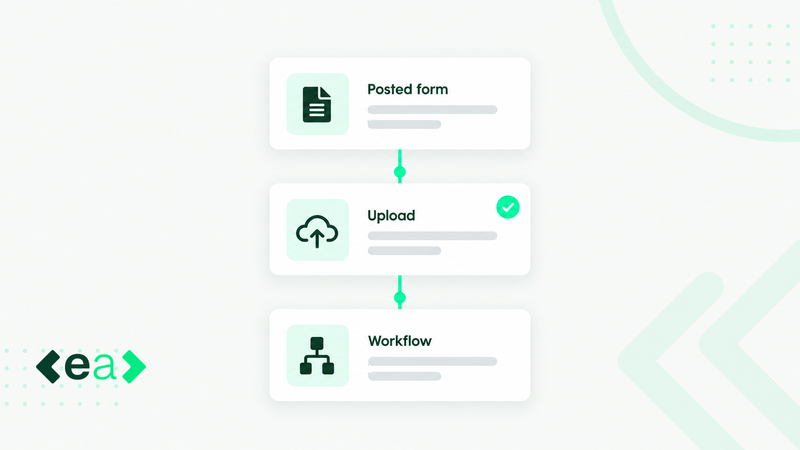
This article covers how to capture a posted form once, in a structured list that keeps every question and sub-question intact, how to get that list into EA for assignment and review, and how to check the capture before the clock runs. The point is to spend the time on the answers.
Why the first capture matters
The questions on a posted form are the contract between you and the buyer. Every later step depends on them: which specialist answers which question, which evidence supports each response, and which items the buyer will score. If a question is missing or reworded, the answer will be marked against the wrong standard, and nobody will notice until the feedback arrives.
That makes the capture step worth doing carefully and once. A clean, numbered list of questions, with section headings and any mandatory markers, gives the team a stable base. Everyone works from the same list, and a question can be traced back to the original page if the buyer disputes the wording.
Capture the structure as well as the words
Start by deciding the columns you need before the typing begins. A useful minimum is the section, the question number, the full question text, any sub-parts, the response format (free text, yes or no, a figure, or an attachment), the word or page limit, and the owner. Add a column for the source page so a reviewer can check the original quickly.
Then work through the form section by section. Keep each sub-question as its own row, even if the buyer printed them as a single paragraph. Mark any question that is mandatory, and copy instructions that change how a response should be laid out. If a question refers to an appendix that did not arrive with the form, log the gap immediately and ask the buyer for it in writing.
Paper cannot be uploaded in its original form. The scan or the typed list is the digital record, and it is worth checking that every page of the original has been captured before the form goes into the workflow. If a page is illegible, say so in the file, and do not guess at the wording.
Get the questions into EA and route them
Once the list is in a digital file, it can enter EA. Upload the spreadsheet or document to the workspace for that bid, and Autofill can work through the questions against approved evidence, showing citations for each answer it drafts. A contributor sees only the questions assigned to them, and each answer moves through its status as it is checked, reviewed and approved. Named reviewers and approvers can comment on answers in place, so a question about insurance reaches the person who owns insurance, with the source page attached. For a broader view of where automation helps in a bid, what tender response automation should actually automate sets out the steps that repay the effort.
Routing follows the same structure. Group questions by subject, match each group to the specialist who can answer it, and set a date that works backwards from the submission deadline. A question about data protection goes to the information security lead. A question about staffing goes to the people function. Keep the routing in the workspace so a change of owner is visible. Where a question needs an expert decision before anyone drafts a response, the handoff matters, and routing tender questions to a specialist describes how to set that up so the question reaches the right person the first time.
Check the capture before the clock runs
Before the first answer is drafted, do one check. Pick five random questions from the list, find them on the original form, and confirm the wording, the numbering and the response format. If any differ, fix the list and recheck. This takes ten minutes and prevents a week of answers that address a slightly different question.
Store the original form with the bid file, and note the date it arrived and the date you captured it. If the buyer later claims a question was missed, you have a clear record of what was received and when.
Keep the captured list as the reference
Once the posted form has been captured, the list becomes the reference for the rest of the bid, so treat it as a controlled document. Mark its version and date, and record any change to a question's wording, so that the team never works from two slightly different versions of the same form. Responses, evidence and review comments should all point to the same question numbers, which lets a reviewer check a response against the exact wording the buyer used and lets you show later which version of the question was answered.
Buyers sometimes send a form that has been edited from an earlier version, or a supplier questionnaire with questions added by hand in the margin. Compare any new form with the one you captured last time, and note every difference in the capture file. A question that has been quietly reworded can change the answer completely, so treat the comparison as part of the capture.
Keep the form and the response linked as well. Store the scan of the original alongside the captured list, and reference the list in the bid file. That link helps after the award too. If the buyer asks questions during evaluation, the team can answer from the same record it used to submit, so nothing has to be rebuilt from memory. When a buyer returns a completed form with comments, keep the comments and the final response together: the buyer's wording of the question is the reference point for the next submission, and the captured list should always match the most recent version they sent.
Spend the effort on the answers
The posted questionnaire will always arrive on paper, and someone will always need to digitise it. The difference lies in whether that step produces a structured list the whole team can use or a pile of typed rows nobody trusts. Capture the questions carefully once, check them against the original, and let every later step build on that base.
If you receive paper or PDF questionnaires regularly, book a demo with EA and bring one sample form, so we can show you how it would move from capture to assigned answers.
Filed under RFPs, Tenders & Questionnaires, 27 October 2026All posts