For risk, compliance and Money Laundering Reporting Officers at UK accounting firms
Every answer your firm sends carries its name.
Your partners do the client work. EA does the firm’s own: it drafts clients’ security questionnaires and the anti-money laundering (AML) return from what the firm has approved, and brings each back finished for the partner or Money Laundering Reporting Officer (MLRO) who signs.
Try EA free. No card needed.


Organisations that run work on EA





The problem
Everyone asks the firm. The same few people answer.
Same questions, new format
Every client whose books you see sends its own questionnaire, in its own words. You answered most of it last month for someone else, and if the two answers differ, both clients have it in writing.
The AML return comes round again
The questions barely change from year to year. The firm’s numbers do, and a return that cites last year’s risk assessment still goes out under the firm’s name.
The facts sit with busy people
Finance holds the client numbers, IT the security controls, the partners what each client buys. The questionnaire and the MLRO wait on all of them.
When a client’s questionnaire lands, what takes the time: finding last year’s answer, getting the evidence, or getting it signed? EA finds last year’s answer and asks for the evidence. The partner does the third, with the evidence in front of them.
What EA does
One email in. A signed-off questionnaire out.Last year’s assessment in. This year’s return out.
A client’s security questionnaire arrives as a spreadsheet, with a date it’s due back. Here is what EA does with it, and what your team still decides.
The anti-money laundering return draws on the firm-wide risk assessment. Here is what EA does each year, and what the MLRO still decides.
01 / 06
- EA
Finds all 140 questions, their answer types and the due date, and keeps the client’s own sections.
Your teamThe Engagement Partner forwards one email and confirms the approver EA proposes.
- EA
Drafts from the firm’s Knowledge Library of policies, certificates and past answers, with the passage each answer came from beside it.
Your teamSection owners check each draft against its source, rather than write it.
- EA
Marks 23 answers “Needs evidence” and groups them by the colleague who holds the fact.
Your teamEach colleague sees only the gaps they hold.
- EA
Sends one ask per person in Microsoft Teams, with their questions and a date, follows up until they reply, and turns each reply into an answer credited to its author.
Your teamOwners reply where they already work; the Engagement Partner sees who is still due.
- EA
Reopens an answer edited after approval, so what the partner signs is what the client gets.
Your teamSection owners review their answers; the Engagement Partner approves the whole response.
- EA
Writes the approved answers into the client’s original spreadsheet, in its own columns.
Your teamThe Engagement Partner sends it back by EA’s secure link, with a password and an expiry date.


01 / 04
- EA
Reads the client list exported from your practice-management system and groups each client into the assessment’s risk categories.
Your teamFinance runs the export; the MLRO checks any client EA couldn’t place.
- EA
Starts this year’s firm-wide risk assessment from last year’s, with this year’s client figures in place.
Your teamThe MLRO rates each risk and signs the assessment off.
- EA
Flags each return answer and client answer that cites last year’s assessment.
Your teamEach answer’s owner checks it against the new assessment.
- EA
The Browser Plugin fills the professional body’s online return from the MLRO’s answers, in Chrome or Edge.
Your teamThe MLRO checks each field and submits the return.
See the same steps on work your firm has open now.See this year’s risk assessment start from last year’s, ready for your MLRO’s ratings.
Book a demoWho it’s for
The judgement stays yours. The drafting doesn’t.
Engagement Partner
On your desk
Clients’ security and supplier questionnaires, whatever the client buys from you.
With EA
Forward one email, then check finished answers instead of writing them.
You decide
What the firm tells its client.
Head of Risk or Ethics Partner
On your desk
Firm policies and, for firms that audit, the annual quality management evaluation.
With EA
Policy updates and the annual quality evaluation start as drafts from the firm’s own records, leaving you the conclusions.
You decide
What the evaluation concludes, with the partner who holds ultimate responsibility.
Money Laundering Reporting Officer (MLRO)
On your desk
The firm-wide risk assessment, the annual return to your professional body and clients’ AML questions.
With EA
Update the firm-wide risk assessment once. The return and every client’s AML answer follow from it.
You decide
Every risk rating. Senior management approves the policies.
Information Security Lead
On your desk
Cyber Essentials, and clients’ questions about the ledgers and payroll records the firm holds.
With EA
Answer a control question once; the next client’s wording gets the same answer and evidence.
You decide
Which answers are true. A director or partner signs Cyber Essentials.
Relevant EA features
Answer it once. Check it each time. Use it every year.
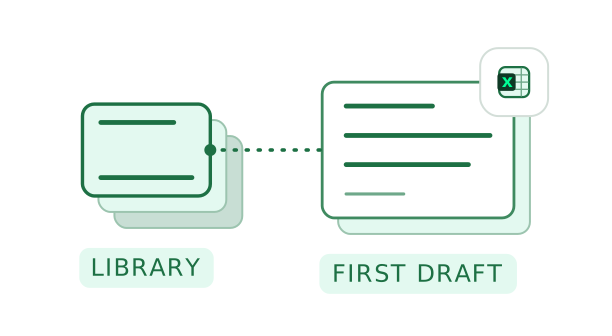
- Knowledge LibraryPolicies, certificates, past answers
 01
Last time’s answer, this time’s draft
The answer a partner signed off for one client becomes the first draft for the next, with the policy behind it a click away.
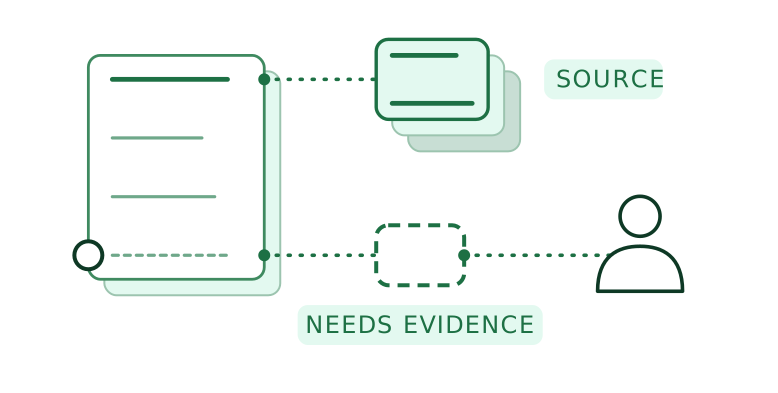
- EA AgentIn Teams, Slack or email
 02
Each gap goes to the person who holds it
EA asks the colleague who holds each fact and follows up until the answer comes back. The AML return works the same way: finance sends the client numbers, the partners confirm the services the firm offers.
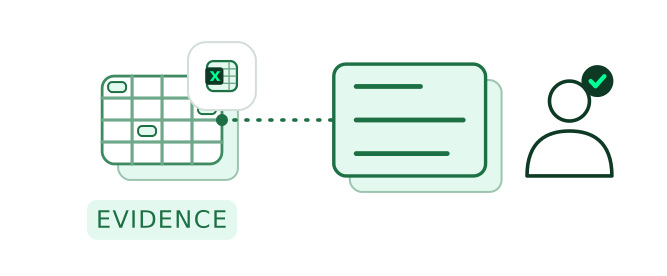
- ApprovalsWho approved what, and when
 03
A named person signs off
The partner sees each answer with its evidence and who reviewed it, then signs. If a client later asks who stood behind an answer, the record says.
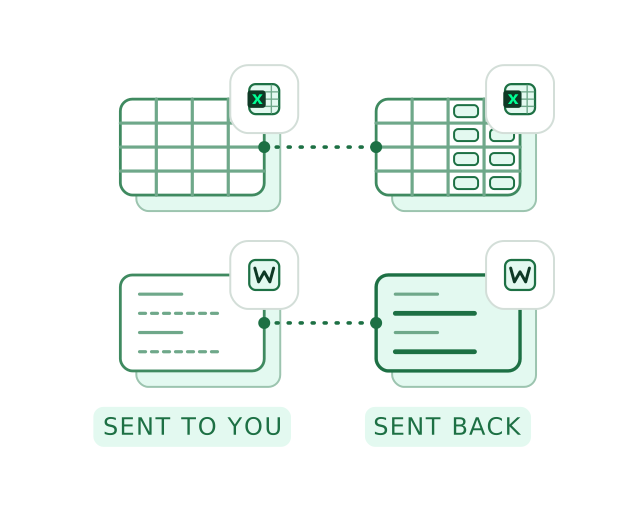
- AutofillThe client’s own file
 04
Back in whatever layout they send
Next year the client sends a new layout. Autofill writes the signed-off answers into that one too, so nobody retypes an answer.
Why EA for accounting firms
What today’s tools still leave to a partner.
| Compared with | What it does well | What EA adds |
|---|---|---|
| Doing it by hand | Last year’s spreadsheet and emails to partners get it done. | Keeps working when the deadline moves or the person who knew leaves, because the answers stay with the firm. |
| Questionnaire software | Keeps a good answer library and routes clients’ questions to experts. | Runs the firm’s own year from the same library too: the AML risk assessment and the return, as well as clients’ questionnaires. |
| A general AI assistant | Reads your files and drafts quickly for the person using it. | Drafts from the firm’s current, signed-off policies and writes the answers into the client’s own spreadsheet, so nobody copies them across. |
EA’s own security
Ask us what your clients ask you.
- Hosted your way
EA’s cloud in a region you choose, hybrid options or on-premises. Data never used to train the models EA runs on.
- Access
Single sign-on, which you can enforce, and an access list for each workspace.
- Support access
EA staff see your data only in a time-limited window you open.
- Testing
An independent firm runs a penetration test on EA every year.
- Security contact
EA’s security team is at security@eaglobal.ai.

The demo shows your Information Security Lead where each client’s files sit, and who can open them.
Book a demoWhat you’ll hand EA
If the firm has to answer for it, hand it to EA.
The firm’s own
- AML firm-wide risk assessmentKept current by the MLRO.Regulatory returns
- AML supervisor returnsYour professional body’s annual return, from the same records.Regulatory returns
- Cyber EssentialsThe yearly self-assessment; its expiry flags the answers that cite it.Security and IT
- ISO 27001The information security standard, with evidence for each control kept current.Security and IT
FAQ
Questions accounting firms ask.
If yours isn’t here, ask it in a demo.
Each draft cites its source, and EA says when the source is missing or out of date. If a client asks whether your Cyber Essentials certificate is current and the stored one has expired, EA marks the answer “Needs evidence” and asks the Information Security Lead for the new one.
The firm, as it is today: EA drafts, and a named person approves. That’s why each answer shows its source and who reviewed it, and why an answer changed after approval goes back to the approver.
Yes. Each client’s files sit in a workspace of their own, open only to the people you add. The firm’s policies can sit in a shared workspace, so when a client’s questionnaire arrives, EA drafts from both: the firm’s policy answer, and that client’s own details, which stay in that client’s workspace.
Your current return still applies. HM Treasury chose the Financial Conduct Authority as the single AML supervisor for professional services on 21 October 2025, and no start date is set. The facts any return draws on, the risk assessment and the client numbers, stay in EA for whatever form it takes.
It starts with what you already have: policies, certificates and last year’s questionnaires, as they are. Your practice-management software stays as it is, with EA beside it, and our Customer Success team helps with exports from other platforms. Plans differ by the number of autofills, the workspaces you need and the size of your knowledge library; see the pricing page.
Yes. Clients’ questionnaires, the AML return, Cyber Essentials and tenders are the same work in every firm. Only the annual quality management evaluation and audit tenders are for firms that audit or review accounts.


Your next client questionnaire, half answered already.
A client’s questionnaire, to your Engagement Partner.