

AI Security Questionnaire Automation for Software Companies
Software deals shouldn'tstall on a questionnaire.
Every enterprise deal comes with paperwork — RFPs, security questionnaires, vendor assessments. EA uses your previous responses and evidence documents to complete them end-to-end, back in the original format.
The questionnaire bottleneck that's slowing your pipeline.
You won the technical evaluation. The buyer loves the product. Then procurement sends a 200-question security assessment and a 40-page RFP.

Sales forwards the questionnaire.
The rep wins the demo, procurement sends a security questionnaire, and the deal goes cold.

Copy-paste, then rewrite everything.
Fragments from three previous responses pasted into a new form. Half the answers don't fit the structure.

Submit late, losing momentum.
The questionnaire goes back two weeks later with answers you didn't have time to verify. The deal is already off.
Three teams. One tool. Different use cases.
- Enterprise RFPs
- Vendor assessments
- Customer due diligence questionnaires
- Security questionnaires
- SOC 2 assessments
- Compliance DDQs
- Technical questionnaires
- Integration and data handling assessments
Respond to every questionnaire without scaling your team.
Automatic answer reuse
Previous approved answers populate new forms — adapted, not copied.
AI-drafted new responses
For questions you haven't seen before, EA drafts responses from your evidence documents, policies, and historical submissions in your company tone and compliance language.
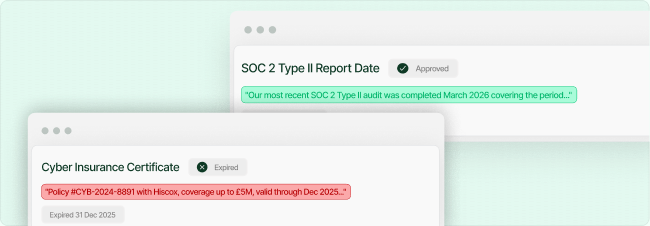
Set expiry dates on approved answers.
When your SOC 2 report date or the sub-processor list goes stale, EA flags it for re-approval before reusing it.
Use Chat to refine
Not happy with a draft? Use Chat to interact with the AI and refine the answer until it's right.
Four steps to submission.

Upload data to your knowledge base
Sync SharePoint, Google Drive, or OneDrive. Select SOC 2 reports, policies, and previous submissions.

Upload the requested form
Drop in the RFP, security DDQ, or vendor assessment. EA auto-drafts and populates approved answers.

Review, assign, and approve
EA drafts responses and highlights what came from previous approved answers. Use Chat to adjust and assign to SMEs.

Export, review, and submit
Download in the buyer's format. Newly approved answers are ready for the next form.
Frequently asked questions
How does EA complete an entire document?

EA reads every question in your uploaded form and matches it against your knowledge base — built from past submissions, policy documents, and team-approved content. It fills the whole form automatically, not one answer at a time.
What if a question has never been answered before?
EA will flag unanswered questions for your team to review and fill in manually. Every new answer you provide gets added to your knowledge base, making future forms faster.
How accurate are the answers?
Accuracy depends on the quality of your knowledge base. Most teams see 85–95% auto-fill accuracy from day one, improving over time as corrections are incorporated.
Is my data safe?
Yes. All data is encrypted at rest (AES-256) and in transit (TLS 1.3). We are ISO 27001 and Cyber Essentials certified and follow SOC 2 security practices. Your data is never used to train AI models.
Where does EA pull answers from?
EA pulls from your own document library — past submissions, policy documents, ESG reports, contracts, and any files you upload to your knowledge base. It never invents answers.
What happens when an answer changes or gets outdated?
You can update answers in your knowledge base at any time. EA always uses the most recent approved version of each answer.
What file formats does EA support?
Excel (.xlsx), Word (.docx), PDF, Google Docs, Google Sheets, and plain text. More formats are added regularly.
Does it integrate with our existing tools?
Yes. EA connects with Google Drive, OneDrive, SharePoint, Outlook, and Slack. A browser extension is also available for web-based forms.
My company is new to ESG reporting. Can I still use EA?
Absolutely. You can start by uploading your existing company documents — annual reports, policies, certifications — and EA will build your knowledge base from there.
How many people can use it in my company?
Plans start at single-user and scale to unlimited seats. Enterprise plans include SSO, audit logs, and dedicated support.
Why not just use ChatGPT or Copilot?
ChatGPT doesn't know your organisation's approved answers. It can't access your past submissions, it doesn't learn from your team's corrections, and it generates one answer at a time with no source tracing. EA returns a completed document from your approved knowledge base with a full audit trail — not a generic AI response you'd need to verify from scratch.
How does pricing work?
We offer per-seat monthly and annual plans, plus usage-based enterprise pricing for large volumes. See our pricing page for details.
Is there a free trial?
Yes. Start a free trial with no credit card required. Upload your first form and see EA fill it — before you talk to anyone.
Results From Teams Using EA.

This is not just saving me time
The AI is answering some questions in a way we wouldn't have thought of.
Intuitive Platform with Outstanding Support — A Must for B Corp Certification
As a Virtual Assistant supporting clients through their B Corp certification process, I've found EA to be an incredibly valuable tool. From my perspective, the platform is intuitive and user-friendly, which makes managing and organising the required documentation so much easier.
Bexi P.
Intuitive, Secure, and Seamless with Familiar Tools
It's very intuitive and enables me to still use Excel, Word and PDFs that I and my team are used to working with. Also much safer than Chat GPT or Copilot.
Andy H, C-3PO