

AI B Corp Assessment Software for B Leaders
Assess Clients Against B Corp StandardsIn A Fraction Of The Time.
Use EA to get initial insights on a client's B Corp readiness, recertification, or to draft their first Impact Report — so you can focus on helping them implement change, not just documenting it.
The Assessment Work That Should Take Days Takes Weeks.
Assessing a client against B Corp standards is valuable but time consuming. Most of your hours go to evidence gathering and form completion, not advising on change.

Gather evidence from every department
Your client's B Corp evidence lives across HR, finance, operations, and supply chain.

Map it all against 184 questions across 8 topics
Each piece of evidence needs mapping against the right topic and question — through a ton of questions and topics.

Draft the assessment, then start over for the next client
You compile the assessment, identify the gaps. Then the next client engagement starts and the whole cycle repeats.
Every stage of the B Corp journey. One tool.
- B Corp Readiness Assessment
- Recertification Gap Analysis
- Impact Report Drafting
The smarter, faster way to guide B Corps through certification.
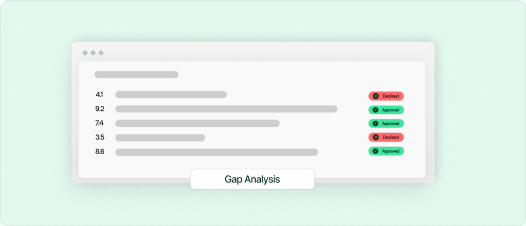
Map your client against all 8 B Corp topics at once
EA analyses client documents and maps them against B Corp topics automatically — instead of spending hours manually reviewing.
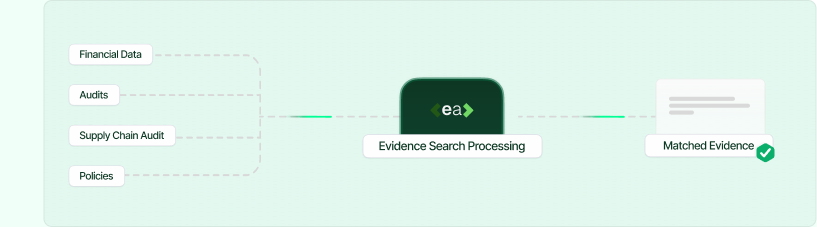
Pull evidence from every corner of the business
B Corp assessments draw on everything — HR policies, financial records, supply chain audits, environmental reports. EA reads across all of it and matches the right evidence to the right question.
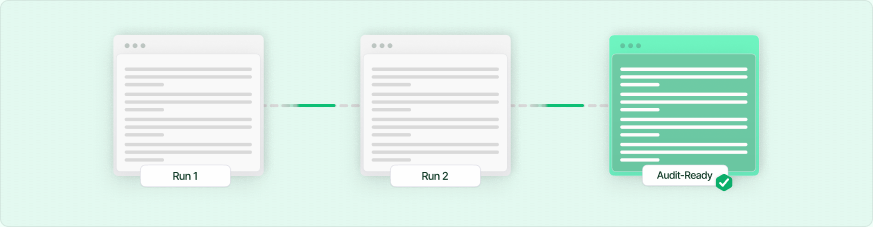
Close the gaps, re-run, watch the progress
After your client addresses the findings, upload their updated documents and run the assessment again. EA tracks improvement across all 8 topics so you can see exactly what moved from gap to covered.
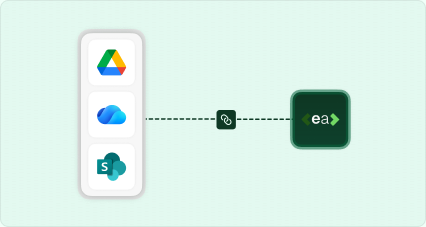
Connect your document store
SharePoint, Google Drive, OneDrive. No migration. EA syncs where you are.
Four steps to certification-ready.

Upload your previous impact assessment
Drop in your client's previous B Impact Assessment or any existing docs from their last certification cycle.

Identify any gaps against the new standards
EA analyses the uploaded docs against the current B Corp requirements — all 8 topics — and identifies gaps.

Ensure the new standards are met
Address the gaps EA identified. Update their documentation and policies to meet the requirements flagged in the analysis.

Generate your new impact assessment with EA
Once your client has addressed the gaps, EA drafts the new impact assessment from their updated documentation.
Frequently asked questions
How does EA complete an entire document?

EA reads every question in your uploaded form and matches it against your knowledge base — built from past submissions, policy documents, and team-approved content. It fills the whole form automatically, not one answer at a time.
What if a question has never been answered before?
EA will flag unanswered questions for your team to review and fill in manually. Every new answer you provide gets added to your knowledge base, making future forms faster.
How accurate are the answers?
Accuracy depends on the quality of your knowledge base. Most teams see 85–95% auto-fill accuracy from day one, improving over time as corrections are incorporated.
Is my data safe?
Yes. All data is encrypted at rest (AES-256) and in transit (TLS 1.3). We are ISO 27001 and Cyber Essentials certified and follow SOC 2 security practices. Your data is never used to train AI models.
Where does EA pull answers from?
EA pulls from your own document library — past submissions, policy documents, ESG reports, contracts, and any files you upload to your knowledge base. It never invents answers.
What happens when an answer changes or gets outdated?
You can update answers in your knowledge base at any time. EA always uses the most recent approved version of each answer.
What file formats does EA support?
Excel (.xlsx), Word (.docx), PDF, Google Docs, Google Sheets, and plain text. More formats are added regularly.
Does it integrate with our existing tools?
Yes. EA connects with Google Drive, OneDrive, SharePoint, Outlook, and Slack. A browser extension is also available for web-based forms.
My company is new to ESG reporting. Can I still use EA?
Absolutely. You can start by uploading your existing company documents — annual reports, policies, certifications — and EA will build your knowledge base from there.
How many people can use it in my company?
Plans start at single-user and scale to unlimited seats. Enterprise plans include SSO, audit logs, and dedicated support.
Why not just use ChatGPT or Copilot?
ChatGPT doesn't know your organisation's approved answers. It can't access your past submissions, it doesn't learn from your team's corrections, and it generates one answer at a time with no source tracing. EA returns a completed document from your approved knowledge base with a full audit trail — not a generic AI response you'd need to verify from scratch.
How does pricing work?
We offer per-seat monthly and annual plans, plus usage-based enterprise pricing for large volumes. See our pricing page for details.
Is there a free trial?
Yes. Start a free trial with no credit card required. Upload your first form and see EA fill it — before you talk to anyone.
Results From Teams Using EA.

This is not just saving me time
The AI is answering some questions in a way we wouldn't have thought of.
Intuitive Platform with Outstanding Support — A Must for B Corp Certification
As a Virtual Assistant supporting clients through their B Corp certification process, I've found EA to be an incredibly valuable tool. From my perspective, the platform is intuitive and user-friendly, which makes managing and organising the required documentation so much easier.
Bexi P.
Intuitive, Secure, and Seamless with Familiar Tools
It's very intuitive and enables me to still use Excel, Word and PDFs that I and my team are used to working with. Also much safer than Chat GPT or Copilot.
Andy H, C-3PO