

AI Due Diligence Automation for Buy-Side & Sell-Side
Due diligence readyat deal speed.
Whether you're acquiring or being acquired, EA reviews your data room, drafts questionnaire responses, and handles information requests — so your deal team focuses on advice, not administration.

Deals don't wait for your DD team to finish reading.
Every deal generates hundreds of questions. Finding the right document, extracting the right clause, and formatting the response consumes the most expensive hours in the firm.

Data room review takes days, not hours.
Associates reading hundreds of documents under deadline pressure. Non-standard clauses go unnoticed. Issues surface after signing, not before.

Buyer information requests arrive in bulk.
A 200+ question DD questionnaire lands on Monday. Partners pull associates off billable work to draft responses from scratch — because last time's answers are buried in a Word doc.

Sell-side responses lack consistency.
Different associates draft different answers to the same questions across rounds. The buyer notices. Confidence erodes.
Buy-side or sell-side. Same platform. Different workflows.
- Data room review and issues extraction
- DD checklist completion and gap analysis
- Management question drafting
- Legal and compliance review support
- Cross-referencing disclosures against precedents
- Buyer information request responses
- Vendor due diligence report preparation
- Consistent answers across multiple buyer rounds
- Data room document mapping to questions
- Management time freed from admin
From data room to done — without scaling your team.
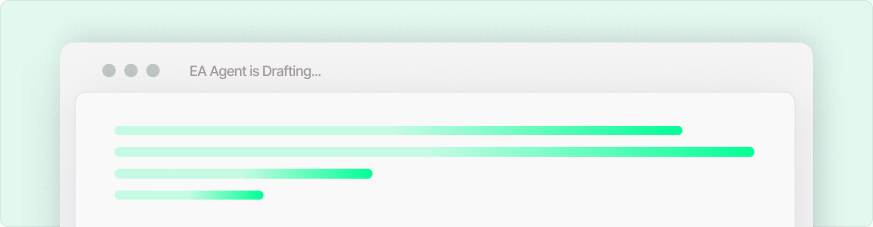
AI-drafted DD responses with source citations
EA reads the data room and drafts responses to every question — with every answer cited to the source document. Partners review and approve, not write from scratch.
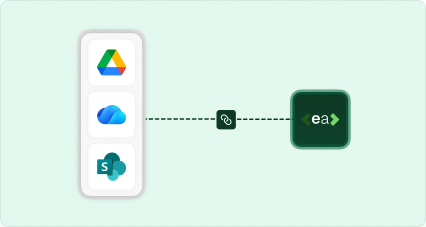
Connect your data room or DMS
SharePoint, iManage, Datasite, Intralinks, Google Drive. EA indexes everything and makes it instantly referenceable.
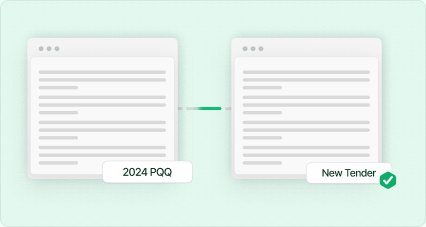
Consistent answers across rounds
Previous approved responses populate new requests — adapted to the specific question, ensuring consistency across multiple buyer processes.
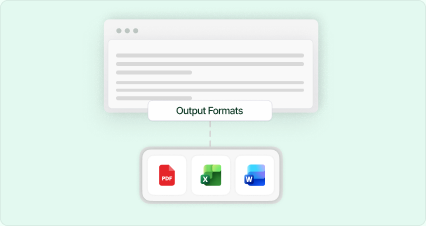
Export in the buyer's format
Word, Excel, PDF, or the buyer's template. Ready for partner sign-off and submission.
Route to the right specialist
Assign tax questions to the tax partner, employment to the employment team. Everyone reviews their section inside EA — no email chains.
Four steps. Data room to submitted.

Connect your data room or knowledge base
Sync EA with your DMS, data room, or document store. Upload previous DD reports, engagement letters, and precedent documents.

Upload the DD questionnaire or information request
Drop in the buyer's questionnaire or your DD checklist. Tell EA whether you're buy-side or sell-side — it adapts the workflow.

EA drafts, cites, and flags gaps
Responses drafted from your documents. Every answer source-cited. Gaps and inconsistencies flagged for partner review.

Review, approve, and export
Partners review drafts, route to specialists, and approve. Export in the required format and submit.
Frequently asked questions
How does EA complete an entire document?

EA reads every question in your uploaded form and matches it against your knowledge base — built from past submissions, policy documents, and team-approved content. It fills the whole form automatically, not one answer at a time.
What if a question has never been answered before?
EA will flag unanswered questions for your team to review and fill in manually. Every new answer you provide gets added to your knowledge base, making future forms faster.
How accurate are the answers?
Accuracy depends on the quality of your knowledge base. Most teams see 85–95% auto-fill accuracy from day one, improving over time as corrections are incorporated.
Is my data safe?
Yes. All data is encrypted at rest (AES-256) and in transit (TLS 1.3). We are ISO 27001 and Cyber Essentials certified and follow SOC 2 security practices. Your data is never used to train AI models.
Where does EA pull answers from?
EA pulls from your own document library — past submissions, policy documents, ESG reports, contracts, and any files you upload to your knowledge base. It never invents answers.
What happens when an answer changes or gets outdated?
You can update answers in your knowledge base at any time. EA always uses the most recent approved version of each answer.
What file formats does EA support?
Excel (.xlsx), Word (.docx), PDF, Google Docs, Google Sheets, and plain text. More formats are added regularly.
Does it integrate with our existing tools?
Yes. EA connects with Google Drive, OneDrive, SharePoint, Outlook, and Slack. A browser extension is also available for web-based forms.
My company is new to ESG reporting. Can I still use EA?
Absolutely. You can start by uploading your existing company documents — annual reports, policies, certifications — and EA will build your knowledge base from there.
How many people can use it in my company?
Plans start at single-user and scale to unlimited seats. Enterprise plans include SSO, audit logs, and dedicated support.
Why not just use ChatGPT or Copilot?
ChatGPT doesn't know your organisation's approved answers. It can't access your past submissions, it doesn't learn from your team's corrections, and it generates one answer at a time with no source tracing. EA returns a completed document from your approved knowledge base with a full audit trail — not a generic AI response you'd need to verify from scratch.
How does pricing work?
We offer per-seat monthly and annual plans, plus usage-based enterprise pricing for large volumes. See our pricing page for details.
Is there a free trial?
Yes. Start a free trial with no credit card required. Upload your first form and see EA fill it — before you talk to anyone.
Results From Teams Using EA.

This is not just saving me time
The AI is answering some questions in a way we wouldn't have thought of.
Intuitive Platform with Outstanding Support — A Must for B Corp Certification
As a Virtual Assistant supporting clients through their B Corp certification process, I've found EA to be an incredibly valuable tool. From my perspective, the platform is intuitive and user-friendly, which makes managing and organising the required documentation so much easier.
Bexi P.
Intuitive, Secure, and Seamless with Familiar Tools
It's very intuitive and enables me to still use Excel, Word and PDFs that I and my team are used to working with. Also much safer than Chat GPT or Copilot.
Andy H, C-3PO